在结束了数组和指针的学习之后,将要学习的是上篇博客结尾关于字符串的相关内容,主要是创建并使用字符串,熟悉C库中的字符和字符串函数,包括去创建一个自定义的字符串函数等内容
表示字符串和字符串I/O 在前面的博客中我们也有介绍,字符串是以空字符(\0)结尾的 char 类型数组,因此我们可以将上一章中关于数组的指针的部分知识运用到字符串之中,由于字符串十分的常用,所以C库中还是提供了许多用于处理字符串的函数。
实例:
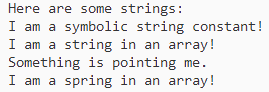
1 2 3 4 5 6 7 8 9 10 11 12 13 14 15 #include <stdio.h> #define MSG "I am a symbolic string constant!" #define MAXLENGTH 81 int main (void ) { char words[MAXLENGTH] = "I am a string in an array!" ; const char *p1 = "Something is pointing me." ; puts ("Here are some strings:" ); puts (MSG); puts (words); puts (p1); words[8 ] = 'p' ; puts (words); return 0 ; }
在上面这段程序中我们需要注意的是和 printf()函数起到一样作用的是 puts()函数,其也属于 stdio.h 头文件中的函数,但是和 printf()不同的是,puts()只显示其中的字符串且在末尾加上换行符。
输出结果:
在程序中定义字符串 在上面的实例程序中使用很多种方法,其中包括字符串常量、char 类型数组、指向字符串的指针来定义字符串:
1.字符串字面量(字符串常量)
用双引号括起来的就是字符串常量,使用双引号会自动在末尾加入 \0 字符,都会作为字符串存储在内存中,从 ANSI C 标准起,若是字符串常量之间没有间隔或者是用空白字符进行隔断,C会将其视作串联起来的字符串。
1
2
3
char greeting[50 ] = "Hello, and" " how are" " you" " today!" ;char greeting[50 ] = "Hello, and how are you today!" ;
若是我们需要在字符串内部使用双引号,则必须在双引号前面加上一个反斜杠(\),字符串常量属于是静态存储类别(在之后我们会说到关于 static ),就说明若是在函数中使用字符串常量,这个字符串只会被存储一次,会在整个程序的生命期内存在,用双引号括起来的内容被视为指向该字符串的储存位置的指针,就类似于数组名作为指向该位置数组的指针。
实例:
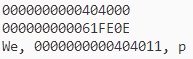
1 2 3 4 5 6 7 8 9 #include <stdio.h> int main (void ) { const char *pt1 = "something" ; const char ar1[] = "something" ; printf ("%p\n%p\n" , pt1, ar1); printf ("%s, %p, %c" , "We" , "are" , *("space farers" + 1 )); return 0 ; }
这一段给我们展示的就是不同的转换说明针对上字符串常量会产生不同的输出结果:
2.字符串数组和初始化
我们在定义字符串数组时,必须让编译器知道需要多少空间,一般来说会使用足够的空间的数组来存储字符串。
1 const char ar[40 ] = "Limit yourself to one line's worth" ;
上述声明中 const 表明不会更改这个字符串,这样的数组初始化比标准化数组初始化要简单的多,还有一个值得注意的是最后的空字符,没有这个空字符就不是一个字符串而是字符数组。在我们指定数组大小时,一定要确保数组的元素个数至少比字符串长度多1(为了容纳空字符)。
我们也可以使用编译器来自动确认字符串的长度(但是仅限在初始化时使用),若是需要稍后再进行填充的字符串的数组就必须指定大小。且大小必须是整型常量或是整型常量的表达式。
同常规数组,字符数组名也是数组首元素的地址。
1
2
3
4
5
6
7
char car[10 ] = "Tata" ;car == &car[0 ]; *car == 'T' ; *(car + 1 ) == car[1 ] == 'a' ; const char *pt1 = "Something is pointing at me" ;const char ar1[] = "Something is pointing at me" ;
同理,我们也可以使用指针指示法创建字符串,正如上述的后两个所示,pt1 和 ar1 均是字符串的地址,但是地址本身还是取决于带双引号的字符串的存储空间。
3.数组和指针
数组和指针的形式有何不同,从上面的声明中我们可以看出,ar1 在计算机的内存中分配为一个内含 29 个元素的数组(带上最后一个空字符),当我们将程序载入内存的时候,字符串会载入静态存储区中,但是在程序开始运行的时候才会为这个数组分配内存。数组名 ar1 是不能改变的,只能进行 ar + 1这样的类似操作,但是不允许进行 ar1++ 的操作,递增运算符只能用于变量,而不能用于常量。
指针形式就截然不同了,虽然也会在静态存储区预留 29 个元素的空间,一旦开始执行程序就会为指针变量 pt1 留出一个存储位置并将字符串的地址存在指针变量中,而由于地址 pt1 是变量,所以可以使用递增运算符。
实例:
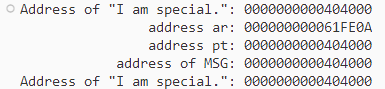
1 2 3 4 5 6 7 8 9 10 11 12 13 #include <stdio.h> #define MSG "I am special." int main (void ) { char ar[] = MSG; const char *pt = MSG; printf ("Address of \"I am special.\": %p\n" , "I am special." ); printf (" address ar: %p\n" , ar); printf (" address pt: %p\n" , pt); printf (" address of MSG: %p\n" , MSG); printf ("Address of \"I am special.\": %p\n" , "I am special." ); return 0 ; }
输出结果:
从上述的结果我们就可以看出,pt 和 MSG 的地址相同,而 ar 的地址不同,同我们前面的讨论内容一致,而且静态数据使用的内存和 ar 使用的动态内存不同。
4.数组和指针的区别
初始化字符数组来存储字符串或是用初始化指针来指向字符串有何区别:
1
2
3
4
char heart[] = "I love Tillie!" ;const char *head = "I love Millie!" ;head = heart; heart = head;
两者主要的区别是:数组名 heart 是常量,指针名 head 是变量,在实际使用上有什么区别,首先两者都是可以使用数组表示法或是指针表示法进行相关操作,但是需要注意的是 只有在 head 中才可以使用递增的相关操作 。若是我们希望两个统一起来可以如上述第三行所示,但是千万不能是第四行这种写法,这样的写法左值是常量不可变,会报错。
另外 heart 数组的元素是可以改变的,其是变量(除非被声明成了 const),但是数组名不是变量。但若是指针形式指向的字符串,就可能会出错了。
1
2
3
4
char *p1 = "Klingon" ;p1[0 ] = 'F' ; printf ("Klingon" );printf (":Beware the %ss!\n" , "Klingon" );
上述这些在编译器中都是为定义的行为,可能会导致程序异常中断,一般来说建议声明指针形式初始化的字符串时使用 const 限定符。但是非 const 数组初始化为字符串数组却不会导致类似的问题,因为数组获得的是原始字符串的副本。
5.字符串数组
若是我们创建一个字符串数组会非常的方便,那样我们就可以通过数组的下标来访问多个不同的字符串。
实例:
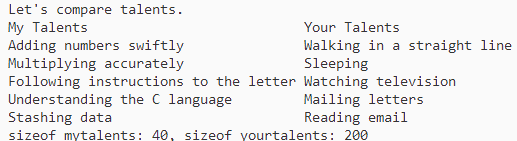
1 2 3 4 5 6 7 8 9 10 11 12 13 14 15 16 17 18 19 20 21 22 23 24 25 26 27 28 #include <stdio.h> #define SLEN 40 #define LIM 5 int main (void ) { const char * mytalents[LIM] = { "Adding numbers swiftly" , "Multiplying accurately" , "Following instructions to the letter" , "Understanding the C language" , "Stashing data" }; char yourtalents[LIM][SLEN] = { "Walking in a straight line" , "Sleeping" , "Watching television" , "Mailing letters" , "Reading email" }; int i; puts ("Let's compare talents." ); printf ("%-36s %-25s\n" , "My Talents" , "Your Talents" ); for (i = 0 ; i < LIM; i++) printf ("%-36s %-25s\n" , mytalents[i], yourtalents[i]); printf ("sizeof mytalents: %zd, sizeof yourtalents: %zd\n" , sizeof (mytalents), sizeof (yourtalents)); return 0 ; }
输出结果:
在一些方面来看,这两个字符串数组非常的相似,都表示五个字符串,使用下标时也是一样的,初始化的方式也差不多;但是两者也有区别,mytalents 数组是一个内含 5 个指针的数组,在系统占用40个字节,那么 yourtalents 是一个内含5个数组的数组,一共是占 200 个字节。剩下的就是前面提到的数组和指针区别了,一个是指向静态内存中的副本,而另一个则是保存了字符字面量的副本(数组),这样的话就存储了两次,而且一般来说数组里面对于内存的使用率比较低。
指针指向字符串字面量也不是全无缺点,数组存储的一个好处就是方便进行更改,而指针的话就不这么容易更改。
指针和字符串 由于字符串是字符数组,只要是数组就难免接触到指针,其实实际上字符串的绝大多数的操作都是通过指针来完成的。
实例:
1 2 3 4 5 6 7 8 9 10 11 #include <stdio.h> int main (void ) { char *mesg = "Don't be a fool!" ; char *copy; copy = mesg; printf ("%s\n" , copy); printf ("mesg = %s; &mesg = %p; value = %p\n" , mesg, &mesg, mesg); printf ("copy = %s; © = %p; value = %p\n" , copy, ©, copy); return 0 ; }
输出结果:
我们可以看到输出是都是意料之中的输出,两个指针的地址也是占据 8 个字节,符合64 位系统的标准,而最后一项就是指针的值也是相同的地址。这样使用指针的目的也很简单,若是我们拷贝整个字符串,元素少则罢了,若是多时一个指针就可以表示,而数组就没这么方便。若确实需要拷贝整个数组,C库也有可以使用的函数 strcpy()或者 strncpy()。
字符串输入 若是想将一个字符串读入程序,首先必须要给字符串预留空间,然后通过输入函数获取该字符串。
分配空间 按照上述的说法,我们第一件事就是分配空间,前面我们知道字符串我们是需要分配足够的空间去存储,而是在读取字符串的时候顺便计算它的长度再进行空间的分配。
1
2
char *name;scanf ("%s" , name);
那么这个时候最简单的办法就是在声明时指明数组的大小:
这个时候 name 就是一个分配了 81 个字节的地址,还有另外一个使用C库的方法来分配内存,在之后的文章中我们会进行学习,分配完内存之后,我们就可以进行读取了,读取函数有:scanf()、gets()、fgets()。
gets()函数 在读取字符串的时候,scanf()和转换说明 %s 只能读取一个单词,但是一般我们都会需要读取一整行输入而不是一个单词。gets()函数就是处理这个情况的,用法是读取整行的输入,遇到换行符丢弃,在结尾加上空字符变为一个字符串;一般和 puts()函数搭配使用,puts()函数是显示字符串,并在末尾加上换行符。
实例:
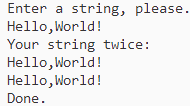
1 2 3 4 5 6 7 8 9 10 11 12 13 #include <stdio.h> #define STLEN 81 int main (void ) { char words[STLEN]; puts ("Enter a string, please." ); gets(words); printf ("Your string twice:\n" ); printf ("%s\n" , words); puts (words); puts ("Done." ); return 0 ; }
运行结果:
按照上述结果整行的输入都被存储在 words 中,再利用 puts ()函数进行输出,但是还会出现意外的情况,gets()函数的参数就只有 words ,它是无法检测数组是否装的下输入行的,前面我们知道数组名只是一个地址,那么 gets()函数只会知道开始处,而不会知道数组有几个元素。
这时候就有可能会出现字符串过长导致缓冲区溢出的情况,这个情况验证也很简单,我们只需要将 STLEN 改为 5 即可。这里特意提到 gets()函数就是因为该函数的不安全性会造成显著的安全隐患。所以在最新的标准里该函数已经不能使用了。
gets()的替代 上面我们介绍 gets()这个问题函数,那么在剔除这个函数之后,拿那个函数来替代它的功能,那就是 fgets()函数,fgets()的用法稍显麻烦,处理输入的方式也略有不同,最新的标准中 gets_s()也可以替代。
1.fgets()和 fputs()函数
fgets()函数通过第二个参数限制读入的字符数来解决溢出的问题,该函数专门设计用于处理文件输入。和gets()区别如下:
fgets()函数的第二个参数指明了读入字符的最大数量,若为 n ,则会读到 n - 1 个字符,或者遇到第一个换行符为止。
且 fgets()函数读到一个换行符会将其存到字符串中,也与gets()不同。
该函数的第三个参数指明了要读入的文件,若是从键盘输入的数据,则以 stdin 作为参数。而且该函数一般是与 fputs()函数一起使用,除非该函数不在字符串末尾添加换行符,fputs()函数的第二个参数指明要写入的文件,应当使用 stdout 作为参数。
实例:
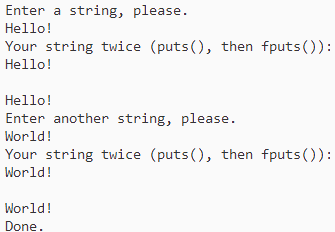
1 2 3 4 5 6 7 8 9 10 11 12 13 14 15 16 17 18 #include <stdio.h> #define STLEN 14 int main (void ) { char words[STLEN]; puts ("Enter a string, please." ); fgets(words, STLEN, stdin ); printf ("Your string twice (puts(), then fputs()):\n" ); puts (words); fputs (words, stdout ); puts ("Enter another string, please." ); fgets(words, STLEN, stdin ); printf ("Your string twice (puts(), then fputs()):\n" ); puts (words); fputs (words, stdout ); puts ("Done." ); return 0 ; }
输出结果:
这个输出结果我们可以看到,fgets()函数还是将换行符放在了字符串的末尾,而puts()函数在输出时也会加上换行符,所以会打印出空的一行,而fputs()就没有。
fputs()函数返回指向 char 的指针,若是一切顺利,函数的返回的地址和传入的第一个参数相同,若是读到了文件结尾,就会返回一个空指针(null point),不会指向任何有效数据,用于标记特殊情况,可以使用 0 来代替,在C语言中用宏来实现更为常见。
实例:
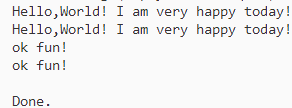
1 2 3 4 5 6 7 8 9 10 11 #include <stdio.h> #define STLEN 10 int main (void ) { char words[STLEN]; puts ("Enter string (empty line to quit):" ); while (fgets(words, STLEN, stdin ) != NULL && words[0 ] != '\n' ) fputs (words, stdout ); puts ("Done." ); return 0 ; }
输出结果:
在这个程序中,我们可以看出输入的字符串长短对于输出并没有任何的影响,在读取了九个字符之后,还能接着读取后续的字符,fgets()储存换行符有好处也有坏处,坏处在于我们并不希望换行符存储在字符串中,可能会带来一些麻烦;好处在于对于存储的字符串而言,检查末尾是否有换行符能判断是否读取了一整行。
处理换行符我们可以在已存储的字符串中查找换行符,并将其替换为空字符;其次,若是仍然有字符串留在输入行,我们可以利用 getchar()进行读取但不储存入输入来进行丢弃。
实例:
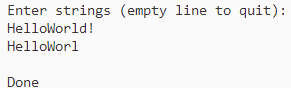
1 2 3 4 5 6 7 8 9 10 11 12 13 14 15 16 17 18 19 20 21 22 #include <stdio.h> #define STLEN 10 int main (void ) { char words[STLEN]; int i; puts ("Enter strings (empty line to quit):" ); while (fgets(words, STLEN, stdin ) != NULL && words[0 ] != '\n' ) { i = 0 ; while (words[i] != '\n' && words[i] != '\0' ) i++; if (words[i] == '\n' ) words[i] = '\0' ; else while (getchar() != '\n' ) continue ; puts (words); } puts ("Done" ); return 0 ; }
输出结果:
从这个程序我们可以看出在读取了字符串之后,会对其进行检查,并且将多余的字符串进行丢弃。
空字符和空指针
在上面的学习中,出现的两个重要概念,空字符和空指针,从概念上看,空字符(’\0’)主要是用于标记C字符串末尾的字符,其对应的字符编码是 0 ,也就是ASCII码。
反观空指针(NULL)有一个值,该值不会和任何数据的有效地址相对应,一般来说,空指针多用于函数返回一个有效的地址表示特殊情况的发生,例如文件结尾或者读取出错等。
从数据类型来看,空字符是整数类型,而空指针是指针类型,弄混的点主要在于都能用数值 0 来表示,空字符是字符,占1字节;空指针是指针,占4字节。
2.gets_s()函数
在C11标准中新增了 gets_s()函数和 fgets()一样,用一个参数来限制读入的字符数,可以将上面程序中的fgets()函数进行替换来试试看效果。
这两个函数的区别在于,gets_s()函数只会从标准输入读取数据,所以并不需要stdin 这个参数,而且 gets_s()函数读到换行符会丢弃而不是存储。
gets_s()函数若是读到最大字符数都没有读到换行符,会将数组的首字符设置为空字符,读取并丢弃剩下的输入直到读到换行符或者文件结尾,然后返回空指针。从这我们可以看出若是输入行未超过最大字符数,gets_s()函数和 gets()函数的作用就是一样的。
这三个输入函数,若是输入行装得下,三个函数都不会有问题,但是 fgets()函数会保留末尾的换行符作为字符串的一部分。总的来说就是 fgets()函数是这三个输入函数中相对来说最好用的。
3.s_gets()函数
在上面的第三个程序中,展示了读取整行输入并且用空字符来替代换行符,那么既然没有这样的标准函数,我们可以自定义一个。
自定义函数 s_gets()
1
2
3
4
5
6
7
8
9
10
11
12
13
14
15
16
17
char *s_gets (char *st, int n) { char *ret_val; int i = 0 ; ret_val = fgets(st, n, stdin ); if (ret_val) { while (st[i] != '\n' && st[i] != '\0' ) i++; if (st[i] == '\n' ) st[i] = '\0' ; else while (getchar() != '\n' ) continue ; } return ret_val; }
这段程序思路是仿照上面的第三个程序,丢弃剩下的字符是因为多出来的字符会被留在缓冲区,成为下一次的读取的输入,该函数其实也不是很完善,在遇到不合适的输入时毫无反应,丢弃字符时也不会告知用户。
scanf()函数 上面介绍的都是最简单的输入输出函数,来探究一下最早使用的输入函数———- scanf()函数,在最开始我们都是使用 scanf()和%s 转换说明来读取字符串,和gets()和 fgets()的区别在于如何确定字符串的末尾:scanf()更像是获取单词的函数,而不是获取字符串,若是预留的存储区装得下输入行,gets()和fgets()会读取第一个换行符前的所有字符,而 scanf()函数就只有两个结束条件:
第一种情况:遇到空格、空白字符、制表符、换行符等结束。
第二种情况:指定字段宽度也可以使得读取停止。
scanf()函数返回一个整数值为读取的项数,或是返回EOF(读到文件的结尾)。
实例
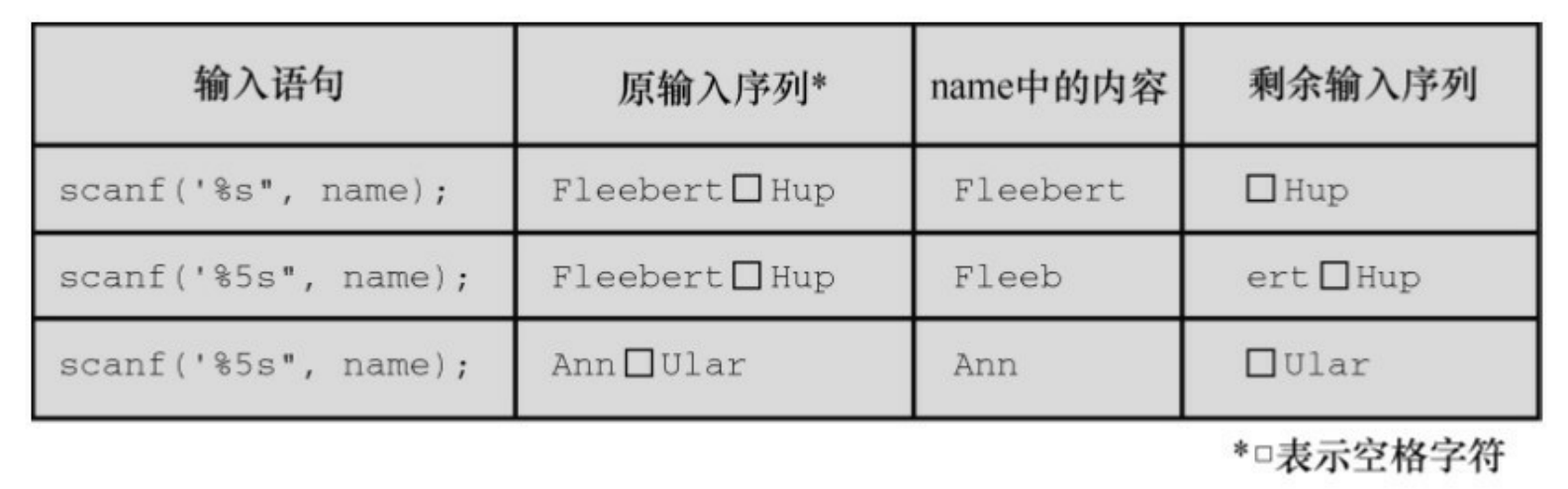
1 2 3 4 5 6 7 8 9 10 #include <stdio.h> int main (void ) { char name1[11 ], name2[11 ]; int count; printf ("Please enter 2 names.\n" ); count = scanf ("%5s %10s" , name1, name2); printf ("I read the %d names %s and %s.\n" , count, name1, name2); return 0 ; }
输出结果:
按照输入数据的性质,其实是fgets()函数读取键盘的数据更为合适,scanf()不适合读取分开的字符串,scanf()和 gets()类似,也有一些潜在的缺点,若是输入行过长,scanf()也会导致数据溢出,在转换说明 %s 前面加上字段宽度可以很好的防止这一点。
字符串输出 结束了输入的学习,接着来讨论一下字符串输出。主要是 puts()、fputs()和printf()。
puts()函数 该函数的用法还是比较简单的,只需要把字符串的地址作为参数 传递给它即可。
实例
1 2 3 4 5 6 7 8 9 10 11 12 13 14 #include <stdio.h> #define DEF "I am a #defined string." int main (void ) { char str1[80 ] = "An array was initialized to me." ; const char *str2 = "A pointer was initialized to me." ; puts ("I'm an argument to puts()." ); puts (DEF); puts (str1); puts (str2); puts (&str1[5 ]); puts (str2 + 4 ); return 0 ; }
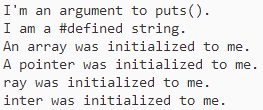
输出结果:
这个程序就展示了 puts()函数的用法和效果,puts()函数会在显示字符串的时候自动在末尾添加一个换行符,同时也说明了带双引号的字符串常量也会被视为其地址,其中表达式 &str1[5] 是从数组的第六个元素开始输出,当puts()函数在遇到了空字符就会停止输出。
错误实例
1 2 3 4 5 6 7 8 9 #include <stdio.h> int main (void ) { char side_a[] = "Side A" ; char dont[] = { 'W' , 'O' , 'W' , '!' }; char side_b[] = "Side B" ; puts (dont); return 0 ; }
这个程序由于dont 数组没有空字符就会导致 puts()函数不知道在何处停止,但是在程序中 dont 数组在side A 和 side B 之间,那么编译器就会读取存储在内存中的别的数组来寻找空字符用来结束,但这样做是很不靠谱的。
fputs()函数 该函数是针对文件定制的版本,和 fgets()基本类似,区别主要在于该函数的第二个参数要指明写入数据的文件,若是打印在显示器上用的是 stdout 作为参数。
其次,fputs()函数不会在输出的末尾添加换行符。
**Tip:gets()丢弃输入中的换行符,但是puts()在输出中添加换行符。另
若是我们需要写一个循环,就可以利用这一对函数来进行输入和输出的功能编写。
printf()函数 在前面的学习中,学习过关于 printf()函数的使用方法,和 puts()类似,printf()也是把字符串地址作为参数,但是printf()函数用起来没有 puts()那么方便,但是更加好用,因为它可以格式化不同的数据类型;而且puts()函数不会在每一个字符串末尾加上一个换行符。
1
2
printf ("%s\n" , string );puts (string );
在执行时间上 printf()函数也会花更多的时间,需要输入更多的代码,所谓是有利必有弊。
自定义输入/输出函数 C库中的函数不一定是最好的,我们一般也可以使用自己写的函数,若是需要一个类似 puts()但不添加换行符的函数,如下:
1 2 3 4 5 6 #include <stdio.h> void put1 (const char * string ) { while (*string != '\0' ) putchar (*string ++); }
有些时候,while中的条件可以更加简化为(*string),若是空字符,直接就会跳过不会继续循环。
我们也可以加入一个统计字数的功能:
1 2 3 4 5 6 7 8 9 10 11 12 #include <stdio.h> int put2 (const char * string ) { int count = 0 ; while (*string ) { putchar (*string ++); count++; } putchar ('\n' ); return count; }
这两个函数都是可以进行使用的,下面是一个使用实例:
实例:
1 2 3 4 5 6 7 8 9 10 11 12 13 14 15 16 17 18 19 20 21 22 23 24 25 26 27 28 29 #include <stdio.h> void put1 (const char *) ;int put2 (const char *) ;int main (void ) { put1("If I'd as much money" ); put1(" as I could spend,\n" ); printf ("I count %d characters.\n" , put2("I never would cry old chairs to mend." )); return 0 ; } void put1 (const char *string ) { while (*string ) putchar (*string ++); } int put2 (const char *string ) { int count = 0 ; while (*string ) { putchar (*string ++); count++; } putchar ('\n' ); return (count); }
执行结果:
程序中先使用 put2()函数,再使用 printf()函数打印出 put2()函数的返回值就能得到上述的输出了。
字符串函数 C库中还提供大量的处理字符串的函数,ANSI C 将这些函数的原型放在 string.h 头文件中,一般常用的有 strlen()、strcat()、strcmp()、strncmp()、strcpy()和 strncpy(),还有一些函数的原型在 stdio.h 的头文件中。
strlen()函数 该函数主要是用于统计字符串的长度,下面就是一个简单的应用:
1
2
3
4
5
void fit(char *string , unsigned int size){ if (strlen (string ) > size) strlen [size] = '\0' ; }
在这个函数中需要改变字符串,所以不用加上 const 限定符。
实例:
1 2 3 4 5 6 7 8 9 10 11 12 13 14 15 16 17 18 19 20 #include <stdio.h> #include <string.h> void fit (char *, unsigned int ) ;int main (void ) { char mesg[] = "Things should be as simple as possible," " but not simpler." ; puts (mesg); fit(mesg, 38 ); puts (mesg); puts ("Let's look at some more of the string." ); puts (mesg + 39 ); return 0 ; } void fit (char * string , unsigned int size) { if (strlen (string ) > size) string [size] = '\0' ; }
执行结果:
这个函数将第39个字符逗号替换成了 ‘\0’ ,puts()函数在空字符处停止输出,并且忽略其余字符,但是这些字符仍在缓冲区,我们可以使用之前读取字符的方法将这些字符抛弃,也可以将他们打印下来。
strcat()函数 该函数主要用于拼接字符串,参数主要是两个字符串,过程是将第二个字符串的备份附加到第一个字符串的末尾,并将拼接后的新字符串作为第一个字符串,第二个字符串保持不变,函数类型属于char * ,就是字符串指针,返回值是第一个字符串的地址。
实例:
1 2 3 4 5 6 7 8 9 10 11 12 13 14 15 16 17 18 19 20 21 22 23 24 25 26 27 28 29 30 31 32 33 34 35 36 37 38 #include <stdio.h> #include <string.h> #define SIZE 80 char * s_gets (char * st, int n) ;int main (void ) { char flower[SIZE]; char addon[] = "s smell like old shoes." ; puts ("What is your favorite flower?" ); if (s_gets(flower, SIZE)) { strcat (flower, addon); puts (flower); puts (addon); } else puts ("End of file encountered!" ); puts ("bye" ); return 0 ; } char * s_gets (char * st, int n) { char * ret_val; int i = 0 ; ret_val = fgets(st, n, stdin ); if (ret_val) { while (st[i] != '\n' && st[i] != '\0' ) i++; if (st[i] == '\n' ) st[i] = '\0' ; else while (getchar() != '\n' ) continue ; } return ret_val; }
执行结果:
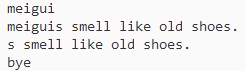
从输出可以看出,flower改变了,但是 addon 没有改变。
strncat()函数 虽然 strcat()函数方便,但是也存在缺陷,那就是由于参数是数组,所以一定会有长度的限制,而且 strcat()函数不能检查第一个数组是否能容纳第二个字符串,若是空间不够就会导致字符串溢出,解决的方法很多,可以先检查长度,或者就是使用 strncat()函数,该函数的第三个参数指定了最大添加字符数。
实例:
1 2 3 4 5 6 7 8 9 10 11 12 13 14 15 16 17 18 19 20 21 22 23 24 25 26 27 28 29 30 31 32 33 34 35 36 37 38 39 40 41 #include <stdio.h> #include <string.h> #define SIZE 30 #define BUGSIZE 13 char * s_gets (char * st, int n) ;int main (void ) { char flower[SIZE]; char addon[] = "s smell like old shoes." ; char bug[BUGSIZE]; int available; puts ("What is your favorite flower?" ); s_gets(flower, SIZE); if ((strlen (addon) + strlen (flower) + 1 ) <= SIZE) strcat (flower, addon); puts (flower); puts ("What is your favorite bug?" ); s_gets(bug, BUGSIZE); available = BUGSIZE - strlen (bug) - 1 ; strncat (bug, addon, available); puts (bug); return 0 ; } char * s_gets (char * st, int n) { char * ret_val; int i = 0 ; ret_val = fgets(st, n, stdin ); if (ret_val) { while (st[i] != '\n' && st[i] != '\0' ) i++; if (st[i] == '\n' ) st[i] = '\0' ; else while (getchar() != '\n' ) continue ; } return ret_val; }
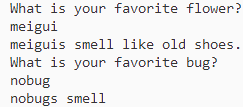
执行结果:
与 gets()函数差不多,strcat()函数也会导致缓冲区溢出,但为什么C11标准不对其进行废弃,因为对于gets()函数来说,隐患主要出在使用该程序的人,而 strcat()函数的问题主要是程序员导致的。
strcmp()函数 该函数是比较字符串的函数,下面是一个不使用该函数进行字符串比较的例子。
实例:
1 2 3 4 5 6 7 8 9 10 11 12 13 14 15 16 17 18 19 20 21 22 23 24 25 26 27 28 29 30 31 32 33 34 35 #include <stdio.h> #define ANSWER "Grant" #define SIZE 40 char * s_gets (char * st, int n) ;int main (void ) { char try[SIZE]; puts ("Who is buried in Grant's tomb?" ); s_gets(try, SIZE); while (try != ANSWER) { puts ("No, that's wrong. Try again." ); s_gets(try, SIZE); } puts ("That's right!" ); return 0 ; } char * s_gets (char * st, int n) { char * ret_val; int i = 0 ; ret_val = fgets(st, n, stdin ); if (ret_val) { while (st[i] != '\n' && st[i] != '\0' ) i++; if (st[i] == '\n' ) st[i] = '\0' ; else while (getchar() != '\n' ) continue ; } return ret_val; }
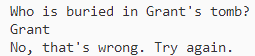
运行结果:
显然执行错误,这是因为我们比较的是两个指针,而不是两个字符串,我们获取字符串的函数返回值是一个指针,断然不会和宏定义的字符串常量一致。更改这个错误,只需要将判别条件更改为 strcmp(try,ANSWER)!= 0 即可。
更改实例:
1 2 3 4 5 6 7 8 9 10 11 12 13 14 15 16 17 18 19 20 21 22 23 24 25 26 27 28 29 30 31 32 33 34 35 36 37 #include <stdio.h> #include <string.h> #define ANSWER "Grant" #define SIZE 40 char * s_gets (char * st, int n) ;int main (void ) { char try[SIZE]; puts ("Who is buried in Grant's tomb?" ); s_gets(try, SIZE); while (strcmp (try, ANSWER) != 0 ) { puts ("No, that's wrong. Try again." ); s_gets(try, SIZE); } puts ("That's right!" ); return 0 ; } char * s_gets (char * st, int n) { char * ret_val; int i = 0 ; ret_val = fgets(st, n, stdin ); if (ret_val) { while (st[i] != '\n' && st[i] != '\0' ) i++; if (st[i] == '\n' ) st[i] = '\0' ; else while (getchar() != '\n' ) continue ; } return ret_val; }
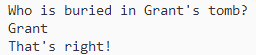
执行结果:
从结果可以看到已经可以正常的识别两个字符串并进行判别,我们需要知道的是该函数的返回值,若相同则返回 0 ,不同返回非零值,而且函数比较的是字符串,不是数组也不是指针,这就大大减少了误判的结果。
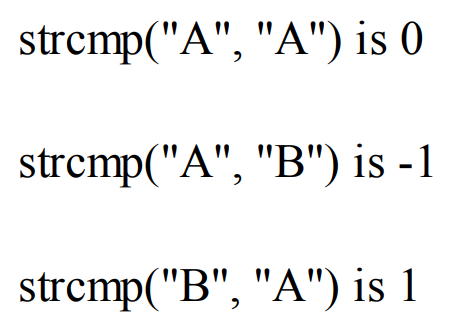
返回值:返回的具体值主要是这两个字符的差值。
若是字符串开始的几个字符相同,则会比较第一个不同的字符(不是字母)。但是一般来说其他值并不重要,而是是否等于 0 。
strcmp()函数是将整个字符串进行比较,直到发现不同的为止,一般也是这么判断的,但是若是需要限定字符数,我们还可以使用 strncmp()函数。
实例:
1 2 3 4 5 6 7 8 9 10 11 12 13 14 15 16 17 18 19 20 21 22 23 24 #include <stdio.h> #include <string.h> #define LISTSIZE 6 int main () { const char * list [LISTSIZE] = { "astronomy" , "astounding" , "astrophysics" , "ostracize" , "asterism" , "astrophobia" }; int count = 0 ; int i; for (i = 0 ; i < LISTSIZE; i++) if (strncmp (list [i], "astro" , 5 ) == 0 ) { printf ("Found: %s\n" , list [i]); count++; } printf ("The list contained %d words beginning" " with astro.\n" , count); return 0 ; }
执行结果:
strcpy()和 strncpy()函数 在前面提过,若是有2个指针指向字符串,那么下面这个语句就是拷贝字符串的地址而不是字符串本身:
pts2 = pts1;
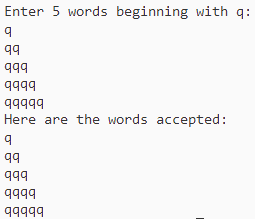
若是希望拷贝整个字符串,我们需要strcpy()函数。下面是一个将首字母是 q 的字符串拷贝到目标数组的例子。
实例
1 2 3 4 5 6 7 8 9 10 11 12 13 14 15 16 17 18 19 20 21 22 23 24 25 26 27 28 29 30 31 32 33 34 35 36 37 38 39 40 41 42 43 44 45 #include <stdio.h> #include <string.h> #define SIZE 40 #define LIM 5 char * s_gets (char * st, int n) ;int main (void ) { char qwords[LIM][SIZE]; char temp[SIZE]; int i = 0 ; printf ("Enter %d words beginning with q:\n" , LIM); while (i < LIM && s_gets(temp, SIZE)) { if (temp[0 ] != 'q' ) printf ("%s doesn't begin with q!\n" , temp); else { strcpy (qwords[i], temp); i++; } } puts ("Here are the words accepted:" ); for (i = 0 ; i < LIM; i++) puts (qwords[i]); return 0 ; } char * s_gets (char * st, int n) { char * ret_val; int i = 0 ; ret_val = fgets(st, n, stdin ); if (ret_val) { while (st[i] != '\n' && st[i] != '\0' ) i++; if (st[i] == '\n' ) st[i] = '\0' ; else while (getchar() != '\n' ) continue ; } return ret_val; }
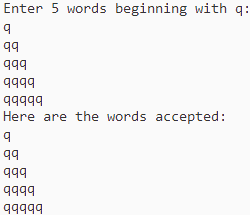
执行结果:
总之可以看出,该函数接受两个字符指针作为参数,一般将第二个指向源字符串的指针声明为指针、数组名或是字符串常量;而指向目标字符串的第一个指针指向一个数组,且该对象有足够的空间储存源字符串的副本,因为数组会分配存储数据的空间,而指针只分配指针的空间。
strcpy()函数的其他属性
第一:函数的返回值类型是char * ,也就是一个字符的地址。
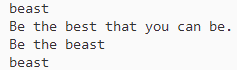
第二:第一个参数不必指向数组的开始,可以拷贝数组的一部分。
实例:
1 2 3 4 5 6 7 8 9 10 11 12 13 14 15 16 17 18 19 #include <stdio.h> #include <string.h> #define WORDS "beast" #define SIZE 40 int main (void ) { const char * orig = WORDS; char copy[SIZE] = "Be the best that you can be." ; char * ps; puts (orig); puts (copy); ps = strcpy (copy + 7 , orig); puts (copy); puts (ps); return 0 ; }
执行结果:
这个例子就很好的展示了strcpy()函数的两个属性,但是该函数也有它的问题,那就是不能检查目标空间是否可以容纳源字符串,我们还可以使用 strncpy()函数更加的安全。
实例:
1 2 3 4 5 6 7 8 9 10 11 12 13 14 15 16 17 18 19 20 21 22 23 24 25 26 27 28 29 30 31 32 33 34 35 36 37 38 39 40 41 42 43 44 45 46 47 48 49 50 51 #include <stdio.h> #include <string.h> #define SIZE 40 #define TRAGSIZE 7 #define LIM 5 char * s_gets (char * st, int n) ;int main (void ) { char qwords[LIM][TRAGSIZE]; char temp[SIZE]; int i = 0 ; printf ("Enter %d words beginning with q:\n" , LIM); while (i < LIM && s_gets(temp, SIZE)) { if (temp[0 ] != 'q' ) printf ("%s doesn't begin with q!\n" , temp); else { strncpy (qwords[i], temp, TRAGSIZE - 1 ); qwords[i][TRAGSIZE - 1 ] = '\0' ; i++; } } puts ("Here are the words accepted:" ); for (i = 0 ; i < LIM; i++) puts (qwords[i]); return 0 ; } char * s_gets (char * st, int n) { char * ret_val; int i = 0 ; ret_val = fgets(st, n, stdin ); if (ret_val) { while (st[i] != '\n' && st[i] != '\0' ) i++; if (st[i] == '\n' ) st[i] = '\0' ; else while (getchar() != '\n' ) continue ; } return ret_val; }
执行结果:
能够看出 strncpy()函数可以将固定数量的字数拷贝到新的字符串数组中,有一个点值得我们注意的是,在拷贝完成之后会将最后一个字符设定为空字符以保证存入的是一个字符串。
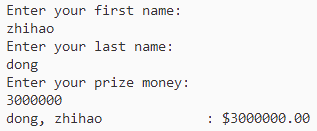
sprintf()函数 该函数的原型在 stdio.h 头文件中,而不是在 string.h 头文件中,和 printf()函数类似,但是其是将数据写入字符串,而不是打印在显示器上,所以该函数也可以将多个元素组合成一个字符串,函数的第一个参数是目标字符串的地址,其余参数和 printf()一样。
实例:
1 2 3 4 5 6 7 8 9 10 11 12 13 14 15 16 17 18 19 20 21 22 23 24 25 26 27 28 29 30 31 32 33 34 35 36 37 38 39 40 41 42 #include <stdio.h> #define MAX 20 char * s_gets (char *st, int n) ;int main (void ) { char first[MAX]; char last[MAX]; char formal[2 * MAX + 10 ]; double prize; puts ("Enter your first name:" ); s_gets(first, MAX); puts ("Enter your last name:" ); s_gets(last, MAX); puts ("Enter your prize money:" ); scanf ("%lf" , &prize); sprintf (formal, "%s, %-19s: $%6.2f\n" , last, first, prize); puts (formal); return 0 ; } char * s_gets (char *st, int n) { char *ret_val; int i = 0 ; ret_val = fgets(st, n, stdin ); if (ret_val) { while (st[i] != '\n' && st[i] != '\0' ) i++; if (st[i] == '\n' ) st[i] = '\0' ; else while (getchar() != '\n' ) continue ; } return ret_val; }
执行结果:
其他字符串函数 在C库中有20多个处理字符串的函数,下面是一些常用的函数:
1
2
3
4
5
6
7
8
9
10
11
12
13
14
15
16
17
18
19
20
21
22
23
24
char * strcpy (char *restrict s1, const char *restrict s2) ;char * strncpy (char *restrict s1, const char *restrict s2, size_t n) ;char *strcat (char * restrict s1, const char * restrict s2) ;char *strncat (char * restrict s1, const char * restrict s2, size_t n) ;int strcmp (const char * s1, const char * s2) ;int strncmp (const char * s1, const char * s2, size_t n) ;char *strchr (const char * s, int c) ;char *strpbrk (const char * s1, const char * s2) ;char *strrchr (const char * s, int c) ;char *strstr (const char * s1, const char * s2) ;size_t strlen (const char * s) ;
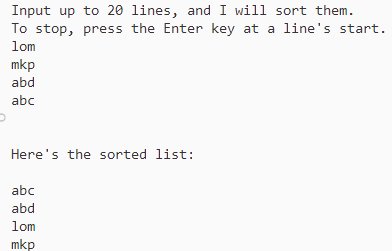
字符串排序 我们可以用一个实际问题来实现字符串处理,大多数名单表、索引都会用到字符串排序。
实例:
1 2 3 4 5 6 7 8 9 10 11 12 13 14 15 16 17 18 19 20 21 22 23 24 25 26 27 28 29 30 31 32 33 34 35 36 37 38 39 40 41 42 43 44 45 46 47 48 49 50 51 52 53 54 55 56 57 58 59 60 61 62 63 64 #include <stdio.h> #include <string.h> #define SIZE 81 #define LIM 20 #define HALT "" void stsrt (char *strings[], int num) ;char * s_gets (char *st, int n) ;int main (void ) { char input[LIM][SIZE]; char *ptstr[LIM]; int ct = 0 ; int k; printf ("Input up to %d lines, and I will sort them.\n" , LIM); printf ("To stop, press the Enter key at a line's start.\n" ); while (ct < LIM && s_gets(input[ct], SIZE) != NULL && input[ct][0 ] != '\0' ) { ptstr[ct] = input[ct]; ct++; } stsrt(ptstr, ct); puts ("\nHere's the sorted list:\n" ); for (k = 0 ; k < ct; k++) puts (ptstr[k]); return 0 ; } void stsrt (char *strings[], int num) { char *temp; int top, seek; for (top = 0 ; top < num - 1 ; top++) for (seek = top + 1 ; seek < num; seek++) if (strcmp (strings[top], strings[seek]) > 0 ) { temp = strings[top]; strings[top] = strings[seek]; strings[seek] = temp; } } char * s_gets (char *st, int n) { char *ret_val; int i = 0 ; ret_val = fgets(st, n, stdin ); if (ret_val) { while (st[i] != '\n' && st[i] != '\0' ) i++; if (st[i] == '\n' ) st[i] = '\0' ; else while (getchar() != '\n' ) continue ; } return ret_val; }
执行结果:
这个例子简单说就是使用两个循环进行遍历对字符串数组进行排序,其中进行排序的是采用指针而不是字符串,这样排序的过程仅仅是针对 ptstr 这个字符指针数组,并未改变原始的字符数组。






 wechat
 alipay